
Product-level Shipping Transfers PRO
Apply a product or variation shipping rule to that line’s quantity-weighted share of WooCommerce order shipping.
Overview#
For standard WooCommerce orders, Split Pay apportions collected shipping across shippable order lines by quantity. A product or variation’s percentage or fixed shipping rule applies to that line’s share and creates a separate shipping transfer leg.
Shipping tax is excluded from product-level shipping transfers. For a shared shipping percentage that includes the corresponding tax, use global shipping with Tax Transfer set to Partial, leaving the shipping to that global rule. This does not provide different tax-inclusive shipping rules for individual products.
Setting up product-level shipping transfers#
Go to Products in your WordPress admin and edit the product you want to configure.
Scroll down to the Product Data panel and click the Split Pay Plugin tab.
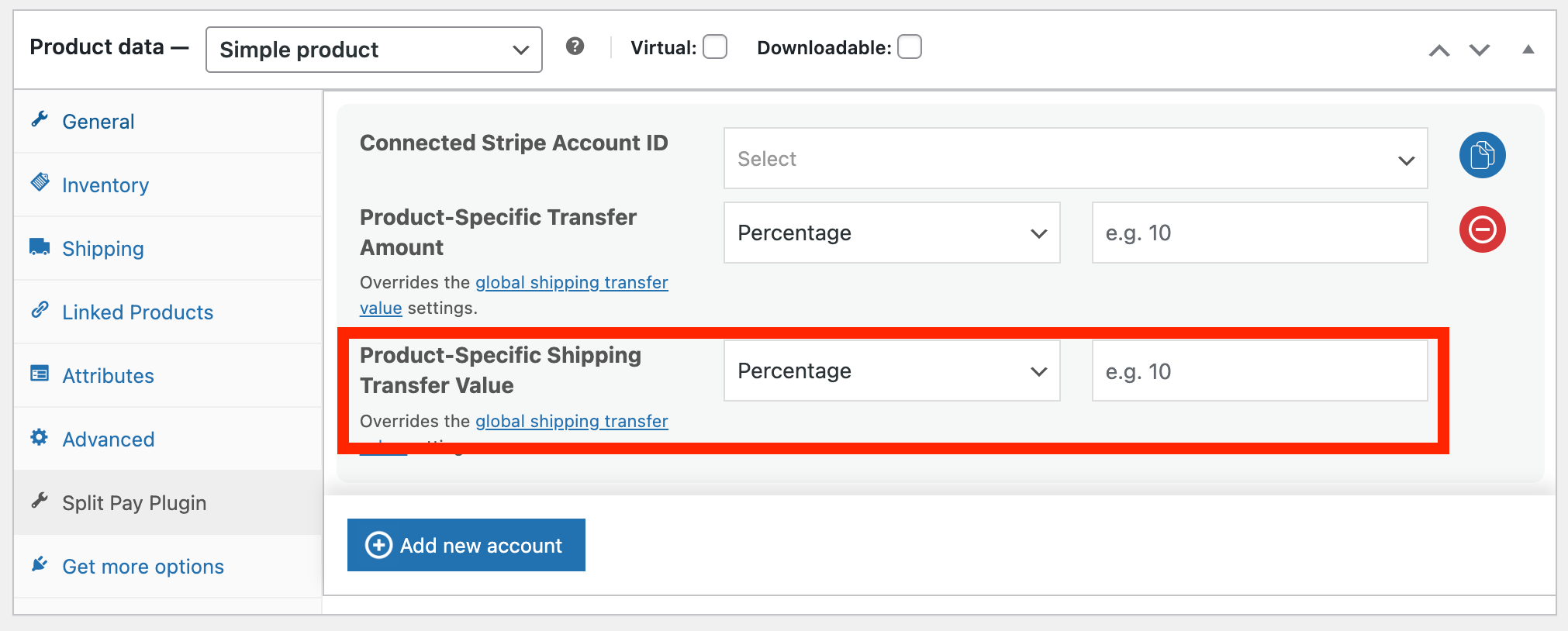
In the Shipping Transfer section, choose a transfer type:
- Percentage — A percentage of the shipping fee allocated to this product.
- Fixed Amount — A fixed amount in the order currency from the shipping fee.
Enter the shipping transfer value.
Save the product.
Variable products#
For variable products, a variation can have its own complete Split Pay recipient rule, including shipping. Navigate to the Variations tab in the product editor and expand the variation.
If the variation has no connected-account configuration, Split Pay can inherit the parent product’s complete rule. If the variation has its own recipient but leaves its shipping fields blank, Split Pay does not mix in only the parent’s shipping fields; that unallocated shipping remains available to the global shipping rule.
Parent inheritance is decided by whether the variation has its own connected-account rule, not by whether its shipping fields alone are blank.
Fallback hierarchy#
The plugin resolves a variation’s product rule first, then applies global shipping to shipping that no product rule allocated:
Split Pay does not combine a variation’s recipient fields with a parent’s shipping fields. Configure the whole variation rule when it needs its own recipient.
Example#
An order has two shippable line items with a quantity of one each and $10.00 total shipping. The T-Shirt has a 40% product-level shipping rule, and a global recipient row has a 25% shipping rule:
- Each line receives a $5.00 shipping base because their quantities are equal.
- The T-Shirt’s shipping leg is $2.00: 40% of its $5.00 share.
- That $2.00 is removed, leaving an $8.00 global shipping pool.
- The global row creates a separate $2.00 shipping leg: 25% of $8.00.
The products’ prices do not affect these shipping bases.
Tip: Use the Bulk Editor to quickly update shipping transfer values across many products at once, rather than editing each product individually.