
Refund handling
Issue a refund through WooCommerce or FluentCart and Split Pay reverses the connected-account transfers that belong to that refund.
Automatic refund handling#
Transfers are reversed automatically. WooCommerce uses line-item and shipping details where the transfer record identifies that component. Amount-only refunds, FluentCart refunds, and WooCommerce global rows without a line association use the individual refund amount as a share of the order total.
Issue the refund from the same store platform that created the order:
- WooCommerce: create the refund on the WooCommerce order. Split Pay reads the refund’s line items, tax, shipping, and total.
- FluentCart: use FluentCart’s refund screen for the normal store-record workflow. Split Pay also listens to FluentCart’s Stripe refund webhook, so a refund created in Stripe can trigger the same reversal when FluentCart receives the event and maps it to the order. See FluentCart refund handling.
Before refunding an older order, keep it in the original charge’s Test/Live mode and platform account. Named gateway adapters read their current mode for the reversal; an unmatched universal adapter can use the only available platform key, whose prefix determines effective mode. Split Pay stops if it cannot verify the original transfer in the selected account.
You issue a refund — Navigate to the order in your store admin (WooCommerce → Orders or the FluentCart → Orders screen), open the order, click Refund, enter the amount, and confirm.
Split Pay builds the exact reversal plan — WooCommerce line-item refunds are matched to affected product-level legs, and refunded shipping is matched to shipping legs. Sequential global rows use their saved line contributions. Global or legacy rows without a line association use the refund-to-order ratio.
Split Pay uses the amount actually sent — Fee allocation, debt recovery, or a transfer ceiling can reduce a vendor’s payout. Refunds use the net amount recorded as sent, never the larger planned amount.
Each result is recorded — The order notes and durable reversal record show which transfer was reversed, recorded as debt, or left incomplete for recovery.
Full refund example#
A $150 order with two transfers:
| Transfer | Original Amount | Reversal Amount |
|---|---|---|
| Vendor A (acct_xxx) | $45.00 | $45.00 (100%) |
| Vendor B (acct_yyy) | $30.00 | $30.00 (100%) |
WooCommerce partial refund examples#
For a line-item refund, product-level transfer legs follow the refunded item. If Vendor A’s $90 item produced a $45 product-level transfer and Vendor B’s $60 item produced a $30 product-level transfer, refunding only Vendor A’s item reverses $45 from Vendor A and $0 from Vendor B. Shipping transfers are unchanged unless the refund includes shipping. A non-sequential global row without an item association uses the overall refund ratio instead.
For an amount-only refund with no item or shipping breakdown, Split Pay falls back to the refund-to-order ratio. A $37.50 refund on the same $150 order is 25%:
| Transfer | Original Amount | Reversal Amount |
|---|---|---|
| Vendor A (acct_xxx) | $45.00 | $11.25 (25%) |
| Vendor B (acct_yyy) | $30.00 | $7.50 (25%) |
Settlement currency and rounding#
Split Pay records what Stripe actually transferred in Stripe’s settlement currency. Reversals use that same currency and its minor units. This keeps cross-currency orders and zero-decimal currencies tied to the original transfer instead of converting the refund again.
Refunds made before the first transfer#
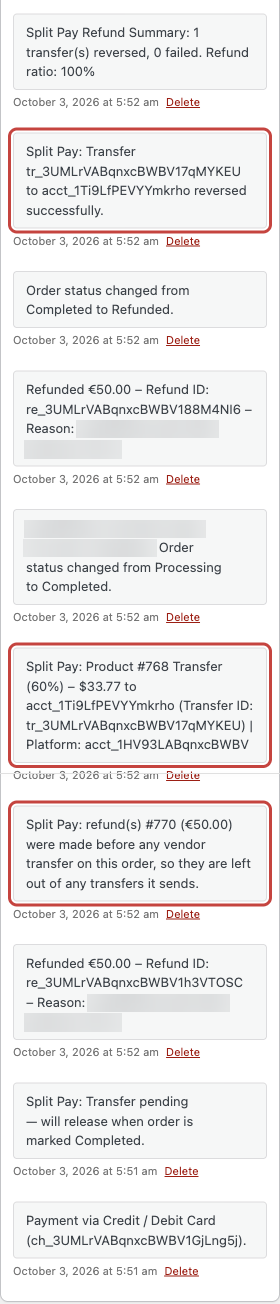
On WooCommerce, a refund can come before Split Pay sends any of the order’s transfers — most often while a delayed transfer PRO is held until the order is Completed. A refund recorded on the order before Split Pay first tries to send the order’s transfers is deducted from those transfers. There is nothing to reverse for it later.
- What the transfers are calculated from. Split Pay calculates the transfers from what the customer still paid. A line-item refund lowers that product’s line, and a shipping refund lowers shipping. An amount-only refund — one not assigned to products or shipping — lowers every line, shipping and tax by the same share of what is left of the order. Percentage splits follow the lower amounts.
- Fixed per-unit amounts drop only by whole refunded units. A line-item refund of whole units lowers the quantity a fixed per-unit amount is multiplied by. An amount-only refund, or a refund of part of a unit, doesn’t reduce a fixed per-unit amount; the fixed amount still never exceeds what is left of the line. For example, on a $100 order of two $50 units with a $10-per-unit fixed split, refunding one whole unit leaves a $10 transfer, while a $50 amount-only refund leaves the $20 transfer. With a $45-per-unit fixed split on the same order, that $50 amount-only refund leaves a $50 transfer — what is left of the line — instead of $90.
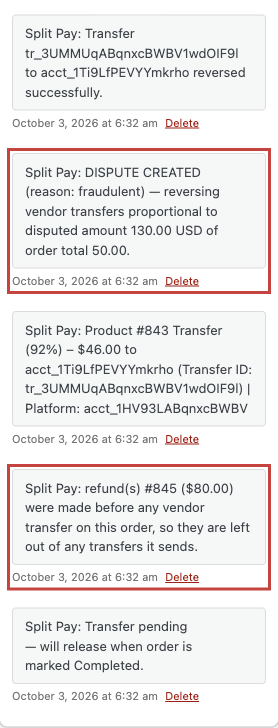
- Order note. An order note names the deducted refunds, for example Split Pay: refund(s) #123 ($20.00) were made before any vendor transfer on this order, so they are left out of any transfers it sends.
- When the list of deducted refunds is fixed. Split Pay saves the list on the order and fixes it once it has saved the transfer plan for the current attempt — just before it first contacts Stripe for that attempt — or once any of the order’s transfers has succeeded. If an attempt is interrupted — for example, Stripe’s response doesn’t arrive — Split Pay finishes it later with the same plan, and a refund recorded only on the order in the meantime is handled like a refund made after the transfer. A refund made through Stripe in the meantime stops that attempt instead; see Known limitations. A retry, automatic or Retry Split Pay Transfers, starts a new attempt: while none of the order’s transfers has succeeded, it deducts every refund recorded so far.
- Refunds recorded later. A refund recorded after the list is fixed is reversed from the vendor’s transfer: Split Pay reverses its share of what the vendor was actually paid, measured against what was left of the order, line or shipping after the deducted refunds. When a chargeback on the order reaches Split Pay, the dispute is measured against the order total less the deducted refunds; see Known limitations for a chargeback that arrives while the transfer is still held.
Limits:
- Record every refund on the WooCommerce order. If Stripe shows a refund on the charge that isn’t among the refunds deducted from the transfers, or the charge is fully refunded, Split Pay stops that order’s transfers and adds an order note.
- With Stripe-fee allocation on, a charge that already has a refund in Stripe — including one made with WooCommerce’s Refund via Stripe button — stops that order’s transfers. Pay its recipients by hand in Stripe. A refund recorded only on the order is deducted, but the transfers still carry the full Stripe fee; see Known limitations.
- With sequential global splits, a retry stops without sending when the order was refunded after its split plan was saved and before any transfer succeeded; see Refunded after a sequential split plan was saved.
- In a three-decimal currency, an amount-only refund of 0.005 or less isn’t deducted; see Known limitations.
- Don’t install an earlier version of Split Pay over this one. Earlier versions don’t know which refunds were deducted before a transfer, so they would reverse later refunds on those orders incorrectly.
Chargebacks#
When a chargeback on a WooCommerce order reaches Split Pay through the WooCommerce Stripe Payment Gateway’s webhook, Split Pay reverses the order’s vendor transfers in proportion to the disputed amount, measured against the order total less any refunds deducted before the first transfer. It never reverses more than is left on a transfer. See What Split Pay does automatically for the webhook this needs.
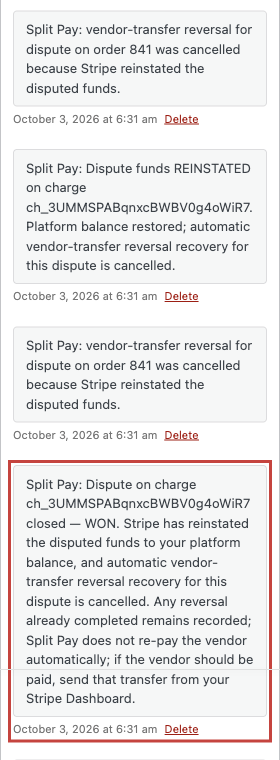
If you win the dispute, Stripe returns the disputed funds to your platform balance. Split Pay adds an order note and doesn’t pay the vendor again; any reversal it already made stays. If the vendor should be paid, send that transfer from your Stripe Dashboard.
Handling failed reversals#
A reversal can fail when the connected account lacks enough available balance or Split Pay cannot verify the exact transfer state:
- Each transfer leg has its own durable reversal record and order note.
- Other prepared legs continue processing; a proven successful reversal is not repeated.
- An unresolved leg remains incomplete and retryable through Split Pay’s automatic recovery path. Review the order notes before taking manual action.
If a vendor’s Stripe balance is insufficient and refund reclaim is off, let Split Pay’s automatic refund recovery finish and follow the order notes. Use a manual Stripe reversal only after an order note says manual review is required, or after you have reconciled and stopped any queued recovery for that reversal. Retry Split Pay Transfers retries failed payouts; it is not a manual refund-reversal control.
To recover future shortfalls automatically, turn on Reclaim shortfalls from future transfers.
Reclaim shortfalls from future transfers#
By default, a reversal rejected because the vendor’s balance is too low remains a failed reversal for you to resolve. With Reclaim refund shortfalls from a vendor’s future transfers enabled, Split Pay records the full unreversed amount as outstanding debt and deducts it from that vendor’s future transfers until the balance reaches zero.
This optional feature is off by default, and PRO is required to enable or change it. Once enabled, the saved ledger remains active if the PRO license later lapses so an existing recovery balance does not silently stop; renew PRO before changing the setting. Split Pay does not guess how much of a failed reversal might have been available or send a second partial reversal after Stripe rejects the full request.
Example
A vendor was paid $100. The customer is refunded in full, but Stripe rejects the $100 transfer reversal because the vendor’s available balance is too low.
| Step | What Split Pay does |
|---|---|
| Refund issued | Split Pay requests the full $100 reversal. |
| Stripe rejects it | No partial reversal is guessed or sent. |
| Debt recorded | Split Pay records $100 as outstanding debt for that vendor. |
| Vendor’s next transfer ($80 due) | Split Pay withholds $80; $20 remains outstanding. |
| Following transfer ($50 due) | Split Pay withholds $20, sends $30, and clears the debt. |
With the default 100% per-transfer recovery limit, a future transfer smaller than the outstanding debt is fully withheld and the remaining balance carries over. Developers can lower that limit with the spp_debt_recovery_max_fraction filter. Each deduction is recorded as an order note.
Enabling it
Go to Split Pay → Global Transfer Settings and enable Reclaim refund shortfalls from a vendor’s future transfers.

Seeing what each vendor owes
Outstanding balances appear on the Split Pay → Platform Status tab, broken down per connected account, Stripe mode, and currency, along with how much has been recovered so far. If a vendor has left your store and will never receive another transfer, use Mark cleared to write the balance off — this only updates the ledger, it never moves money.
How it stays safe
- Per currency and per Stripe mode — a USD debt is only ever recovered from USD transfers, and a test-mode debt never affects live payouts (and vice-versa).
- Never over-charges a vendor — debt is reserved atomically before each transfer, so two orders processed at the same time can't both claw back the same balance.
- Idempotent — a refund that fires twice (for example a manual refund plus a webhook) records the shortfall only once, and a transfer that's retried never double-deducts.
- Accurate refunds afterwards — the transfer log stores the net amount the vendor actually received, so refunding a debt-reduced order reverses exactly what was paid out, never more.
- Forward-only — turning the feature on doesn't retroactively create debt for refunds that already failed; it applies from the moment it's enabled. Turning it back off pauses recovery and leaves existing balances visible on the Platform Status tab.
Requirements for automatic reversals#
- Transfer log entries — The plugin reverses transfers recorded in its transfer log. Orders placed before installation won't have log entries and must be reversed manually.
- Original settlement currency — Split Pay reverses the transfer in the currency and minor units recorded for the original Stripe settlement. See Stripe’s Transfer Reversals API reference.
- Connected account balance — The connected account needs enough available Stripe balance unless optional refund reclaim records the rejected amount as debt.
- Refund trigger — For WooCommerce, create the refund on the WooCommerce order; a Stripe-only refund does not fire WooCommerce’s order-refunded hook. FluentCart can also reach Split Pay from its Stripe refund webhook when FluentCart receives and maps the event to the order. See the FluentCart refund-handling note.
Manual reversals in Stripe#
Use a manual Stripe reversal only for an order Split Pay cannot reverse automatically. Match the exact tr_... transfer, mode, currency, and proven full or partial amount before acting; Stripe can reject a reversal when the connected account lacks enough available balance. Follow Stripe’s current Transfer Reversals reference for the Dashboard or API procedure.
A Dashboard or API reversal happens outside Split Pay and does not update the plugin’s saved reversal record. Do not combine it with an automatic Split Pay reversal for the same amount without reconciling both records first.
Retrying failed transfers#
If transfers fail during initial processing (e.g., network issues or temporary Stripe errors), you can retry them directly from the order page. See Retry Failed Transfers for details.
How Split Pay chooses each reversal amount#
- Full refund: reverse the remaining amount recorded for every completed transfer on the order.
- WooCommerce product refund: use the refunded fraction of the matching ordered item for product-level legs.
- WooCommerce shipping refund: use the refunded fraction of the order’s shipping for shipping legs.
- Sequential global split: use the signed principal and tax contributions saved for each ordered line.
- Amount-only, FluentCart, non-sequential global, or legacy fallback: multiply the amount actually transferred by
refund amount / order total. - WooCommerce refund deducted before the first transfer: reverse nothing — it was already left out of the transfer. Later refunds on that order are measured against what was left after the deducted refunds. See Refunds made before the first transfer.
- Safety limit: never request more than Stripe reports as remaining reversible on the original transfer.