
Vendor Automation PRO
Turn vendor onboarding into a hands-off flow: auto-created products, payment QR codes, vendor and customer emails, and a custom order-received message. Every feature is optional and off by default.
Vendor Automation is a PRO feature set. Every feature here is optional and disabled by default — enabling Vendor Onboarding alone changes nothing about how your site behaves.
Vendor Automation turns Vendor Onboarding into a fully hands-off flow. Without it, you have to create a product for each vendor and assign the vendor's connected account to it by hand. With it, the moment a vendor finishes connecting their Stripe account:
- A WooCommerce product is created automatically and assigned to their connected account at your configured vendor share percentage.
- The vendor gets a payment QR code linking to that product, ready to share, print, or download.
- The vendor and/or the customer receive an email whenever a payment is transferred.
- Customers see a custom "money sent" message on the order-received page.
Together with a Name Your Price plugin, this lets you run a "scan to pay any amount" marketplace — tip jars, donations, peer-to-peer vendor payments — with zero per-vendor admin work. See Accept any-amount payments with QR codes for the full recipe.
Where to find the settings
Go to Split Pay settings → Vendor Onboarding and scroll to the Vendor Automation section.
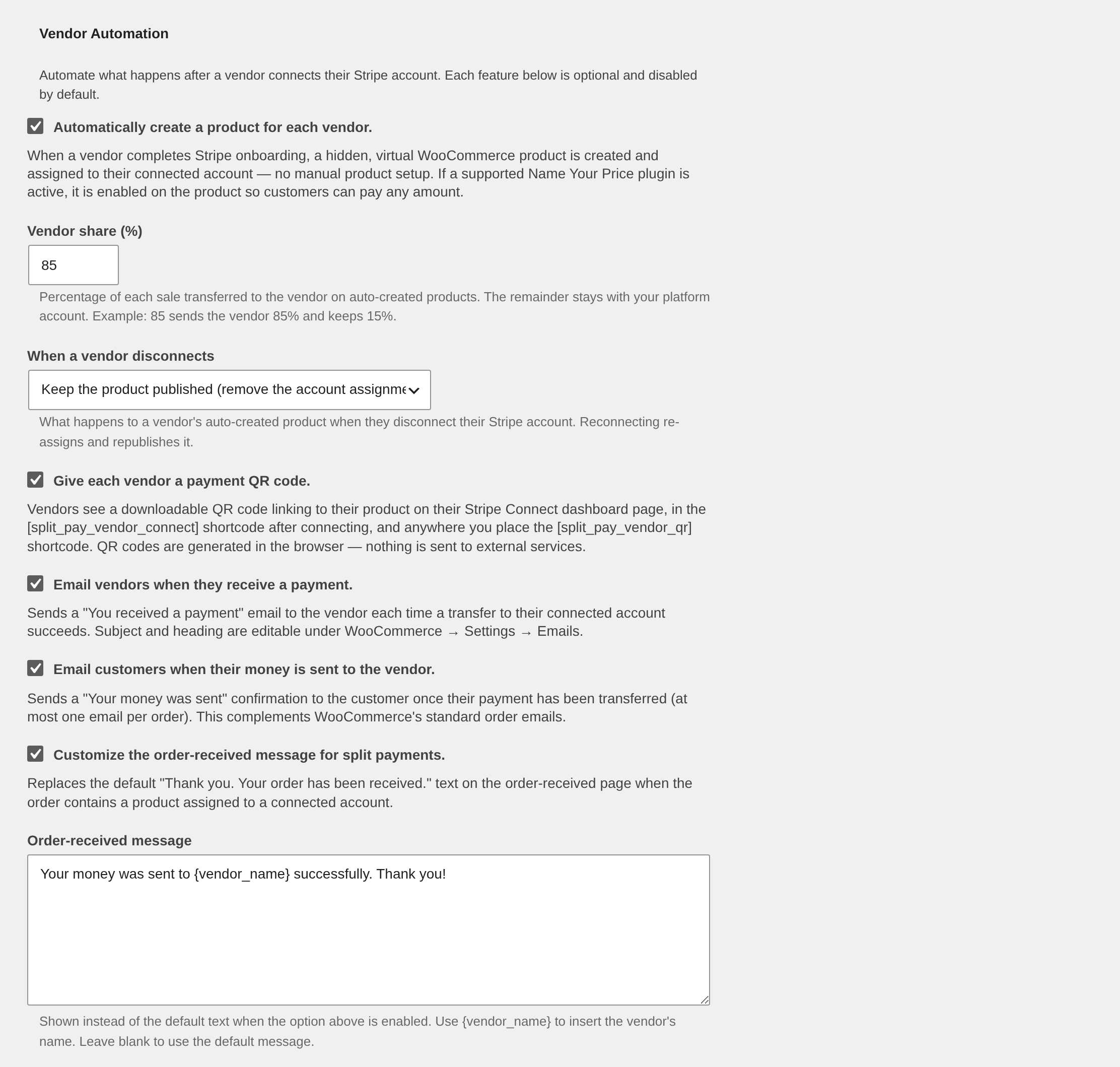
| Setting | Default | What it does |
|---|---|---|
| Automatically create a product for each vendor | Off | Creates and assigns a product when a vendor completes Stripe onboarding. See Automatic Vendor Products. |
| Vendor share (%) | 85 | Percentage of each sale transferred to the vendor on auto-created products. The remainder stays with your platform account. |
| When a vendor disconnects | Keep the product published | Choose whether a disconnecting vendor's product stays published (with the account assignment removed) or is set to draft. |
| Give each vendor a payment QR code | Off | Shows a downloadable QR code linking to the vendor's product. See Vendor Payment QR Codes. |
| Email vendors when they receive a payment | Off | Sends the vendor a "You received a payment" email per successful transfer, naming the product or products it paid for. See Transaction Emails. |
| Email customers when their money is sent to the vendor | Off | Sends the customer a "Your money was sent" confirmation, at most once per order. |
| Customize the order-received message for split payments | Off | Replaces the default thank-you text for orders containing split-pay products. See Custom Order-Received Message. |
Requirements
- Split Pay PRO with Vendor Onboarding configured.
- WooCommerce with a supported Stripe gateway connected to your platform account.
- Optional but recommended: a Name Your Price plugin (see Automatic Vendor Products) so customers can choose the amount they pay.
In this section
- Automatic Vendor Products
- Vendor Payment QR Codes
- Transaction Emails
- Custom Order-Received Message
- Accept any-amount payments with QR codes
Building on these features in code? See Developer Filters for the vendor onboarding & automation hooks.